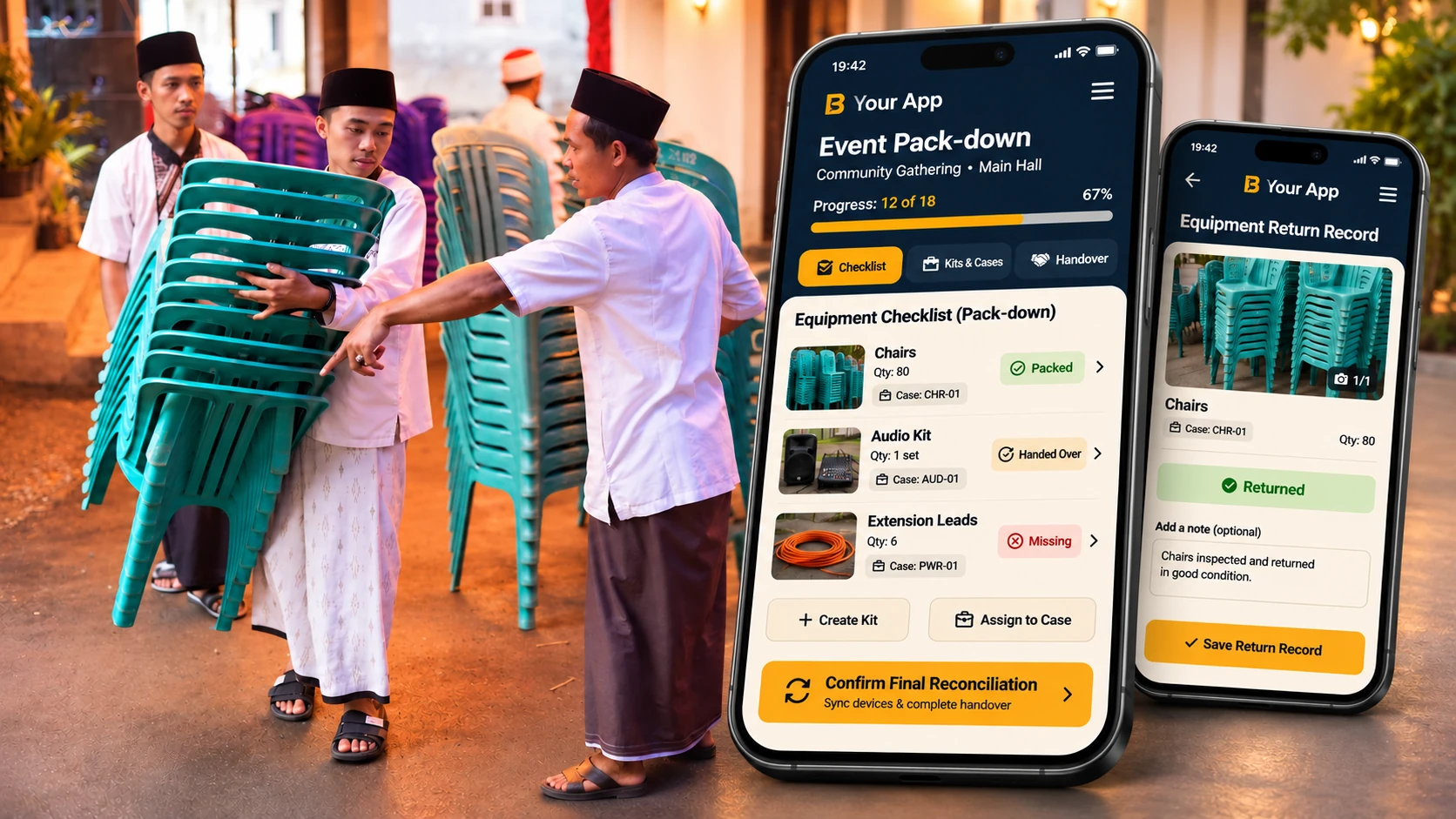
The event has ended, cases are closing and everyone assumes someone else collected the spare microphone. Your app could give a small crew a reusable kit record with named handovers and visible missing items. The aim is a clearer final reconciliation, while acknowledging that an app cannot guarantee nothing is ever lost.
One useful moment.
A reason to open it.
A crew member opens the kit, confirms an item in its labelled case and flags another as handed over. The lead reviews unresolved records before the final reconciliation.
Who would be glad
you built it?
Small event crews
Check equipment against a familiar kit.
Equipment owners
See what left in which case.
Team leads
Resolve missing or handed-over items before departure.
A place in their life.
At the right moment.
Why it belongs on a phone
Crew members check items beside cases and cables. Photo records and offline lists remain usable in venues with poor connectivity.
A reason to come back
Each event reuses a kit and reveals changes worth recording. The final check is a recurring moment teams may value enough to pay for.
Where the money
could come from.
A small event business could pay per active crew for shared kit lists and event history. The fee covers coordination records. Onboarding, storage, syncing and support have costs. Test value during real pack-downs before claiming reduced equipment loss or pricing against hypothetical replacement savings.
The part you could
make your own.
Design for the tired final hour: large clear states, recognisable item photos and an explicit unresolved list. That focused experience could distinguish it from a general inventory spreadsheet.
An angle to test with the people you want to serve.Start with something
worth using.
Start with one reusable kit, item photos, case assignments and packed, missing or handed-over states. Show sync status and require a deliberate final review. Keep purchasing and rental billing outside scope.
- Create a reusable kit with item photos
- Assign equipment to labelled cases
- Mark packed, missing or handed over
- Confirm final reconciliation when devices sync
Give the promise
something to stand on.
You need access to real pack-down routines and a team willing to label cases consistently. Agree who confirms the final state and how conflicting offline updates are reconciled.
Show stale or unsynced records clearly. A tick is a crew member’s report, not proof of location; agree who confirms the final equipment count.
Let a small beginning
teach you something.
Trial the checklist alongside an existing crew's process at a suitable event. Observe tired-user interactions, shared-device changes and the final check, then ask which records helped resolve uncertainty.
Can the team lead distinguish packed equipment from missing items and authorised handovers before declaring the kit reconciled?
Look for these signs
- Items have an agreed case or handover.
- Missing records remain visible.
- Final review happens after relevant devices sync.
A little more
clarity.
Does ticking an item prove it is in the case?
It records a person's action, not physical proof. The crew needs an agreed checking routine and a clear correction process when the recorded state is wrong.
Can crews work offline?
That may be useful, but final reconciliation must account for unsynced changes. The interface should show uncertainty rather than displaying a falsely complete green checklist.
Does this need tracking tags on every item?
No. The first version uses photos, labels and human confirmation. Hardware tracking would add a separate cost and operating workflow.
Now picture it
with your name on it.
Your people. Your priorities. The version you keep thinking about. Answer a few questions and leave with a starting plan you can keep.
Free to explore. No account or email needed for your starting plan.