A small workshop gets power after spending the morning unprepared, then uses part of the window finding materials and deciding what to do first. Your app could help the owner keep power-dependent tasks ready, while clearly separating expected availability from what has actually happened. It organises the response; it does not control the supply.
One useful moment.
A reason to open it.
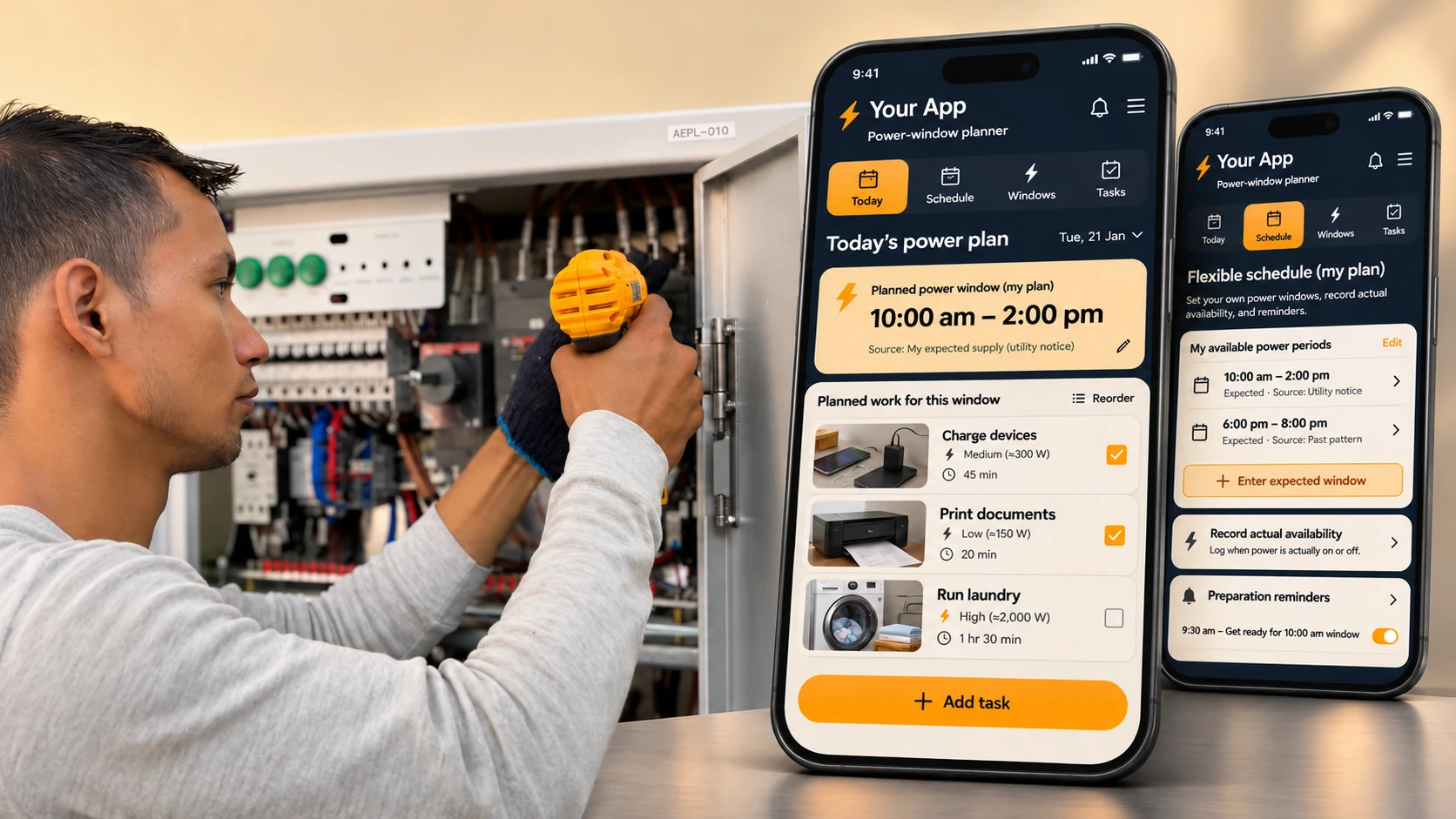
An owner lists tomorrow's tasks, marks their power needs and records an expected window with its source. When availability changes, the task order can change too.
Who would be glad
you built it?
Small workshop owners
Prepare equipment-dependent tasks in advance.
Home-based producers
Separate powered work from other preparation.
Site teams
Share the current work priority at one location.
A place in their life.
At the right moment.
Why it belongs on a phone
The owner can record a power change where work happens. An offline task plan stays available even when connectivity is disrupted.
A reason to come back
Each working day brings another plan to adjust. A simple history can help the owner see what happened without pretending to predict tomorrow.
Where the money
could come from.
Small operators could pay for reusable work plans, history and optional team coordination. The fee buys planning support, not uninterrupted power. Onboarding, syncing and support have costs. Test whether the workflow remains useful across changing weeks before choosing a recurring price.
The part you could
make your own.
Focus on the preparation that can happen before a powered task: materials, files and order priority. That practical distinction could help one trade more than a generic outage alert.
An angle to test with the people you want to serve.Start with something
worth using.
Start with task labels, expected windows, actual availability and preparation reminders. Use manual records first. Do not imply a utility connection or reliable forecast unless a verified service supports it.
- Label tasks by power needs and duration
- Enter an expected window with its source
- Record actual availability as it happens
- Reorder work and set preparation reminders
Give the promise
something to stand on.
You need an understanding of one business's work sequence and realistic task durations. Keep the source of any expected power window visible and let the owner revise the plan when conditions change.
Label expected windows as estimates entered by a person or identified source. This planner does not control electrical equipment, verify installation safety or guarantee supply.
Let a small beginning
teach you something.
Ask willing operators to map a recent working day, then trial a short task plan at one site. Review whether preparation happened earlier and whether changing availability was easy to record.
Does the plan help the owner prepare a useful next task while keeping uncertain power expectations visibly separate from reality?
Look for these signs
- Expected windows show their source.
- Actual availability is recorded distinctly.
- Tasks can be reordered when circumstances change.
A little more
clarity.
Can the app predict when power returns?
Not in this first version. It organises user-entered expectations and observations. Any later forecast would need a reliable source, evaluation and clear limits.
Will it reduce electricity costs?
That is not assumed. The first test concerns preparation and task clarity. Costs depend on the operator's equipment, supply arrangements and decisions, so any savings claim needs separate evidence.
Does the app predict when electricity will return?
No. The first version organises work around windows a user records or expects, with their source and uncertainty visible.
Now picture it
with your name on it.
Your people. Your priorities. The version you keep thinking about. Answer a few questions and leave with a starting plan you can keep.
Free to explore. No account or email needed for your starting plan.